

Piloting
Piloting
To fly your ship effectively in Starfield, master power allocation, manage speed for optimal turning, and use strafing for fine control. Allocate power to your engines for speed and to your shields for defense. Keep your engine throttle gauge centered for better maneuverability in combat. Utilize strafing to move laterally in space.
Will my ship run out of fuel?
Does the ship’s first person display show additional information?
Power management
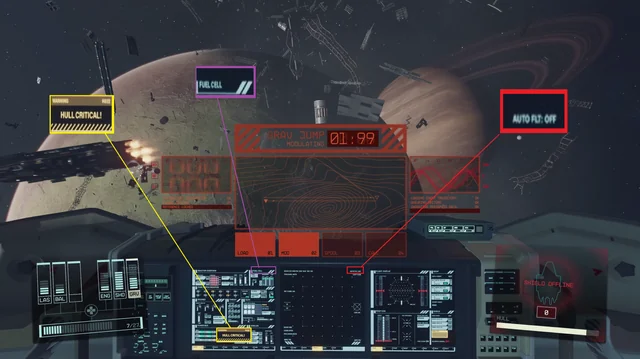
- Engines: Divert more power to your engines for higher top speed and better mobility.
- Shields: Adjust power to increase your shield strength, which protects your ship from damage.
- Crew: Assign crew members to boost specific systems; for example, Vasco can boost shields.
This video explains how to allocate power to your ship’s systems for better performance:
Speed and maneuverability
- Throttle: Center the speed gauge on the HUD for the best turning and handling.
- Boost: Engage the boost for a temporary burst of speed, but be aware that it can drain power.
- Maneuvering: Lower your speed and then increase it after you’ve turned to avoid being an easy target.
Ship control
- Strafing: Hold the spacebar (on PC) to access thruster controls that allow you to strafe up, down, left, and right.
- Docking: Press the A (Xbox) or R (PC) button when prompted to dock with other ships or stations.
Combat tips
- Targeting: Focus on one enemy at a time to reduce the number of threats quickly.
- Weaponry: Use EMP weapons to disable enemy shields and engines without destroying the hull, which allows you to board the ship later.
- Skill progression: Increase your Piloting skill by completing challenges in the simulator at the MAST building.
Fast travel
- Travel: Open the hand scanner, target a location on the planet or in space, and initiate fast travel.
Heads-up display (HUD)
The piloting screen in Starfield is your heads-up display (HUD), which shows your ship’s status, speed, system power, and enemy targeting information. Learning to manage your ship’s systems and allocate power is crucial for surviving combat and navigating space.
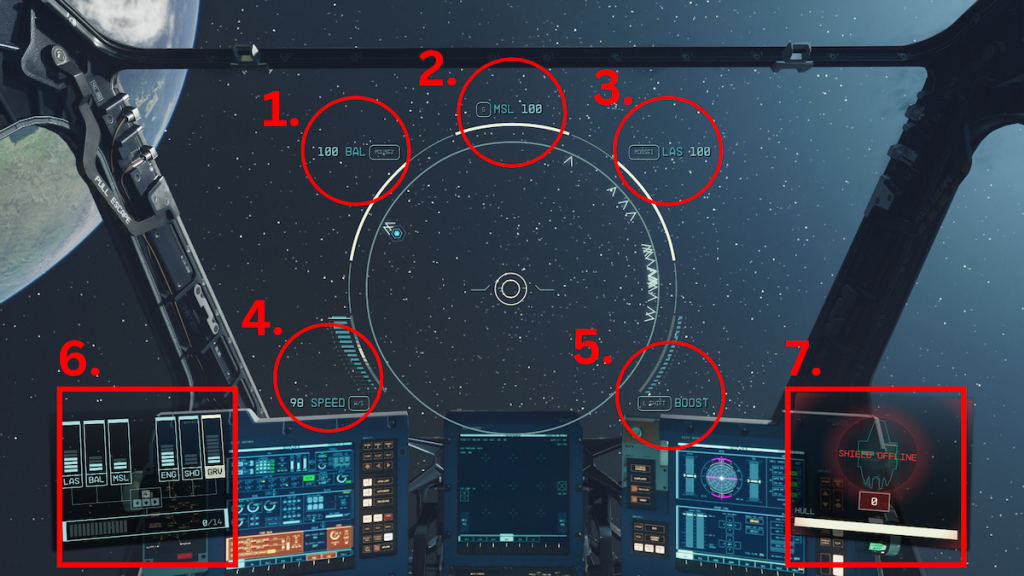
- Ballistics ammo
- Missle ammo
- Laser ammo
- Speed
- Boost
- Power Display and Available power
- Shields
Ship HUD explained
1. Main indicators
- Health and shields: On the bottom right of your screen, a meter displays the status of your ship’s shields and hull. The bar above the ship icon represents your shield’s health, while the bar below it represents your hull’s integrity. Once the shields are down, your hull will begin taking damage.
- Targeting: The center reticle helps you aim, while a blue hexagon marker tracks your current objective. In combat, you’ll see a lead indicator (a circle) that you must aim at to hit a moving enemy. If you have the Targeting Control Systems skill, a separate keybind lets you lock onto a target and fire with improved accuracy.
- Speed: On the bottom left, a gauge shows your current speed. The “sweet spot,” indicated by a white zone on the gauge, is the optimal speed for maximum turning and maneuverability.
- Boost: Your ship’s boost meter is part of the speed gauge. When you engage your boosters, this bar is consumed and then recharges over time.
2. System power allocation
The bottom-left corner of the HUD shows your ship’s power allocation. Your ship’s reactor has a limited amount of energy (blue pips) that you can distribute among your ship’s systems. Use the directional pad on a controller or arrow keys on PC to adjust the power allocated to each system.
- LAS (Laser Weapons): Affects the damage and firing rate of your energy weapons.
- BAL (Ballistic Weapons): Affects the damage and firing rate of your projectile weapons.
- MSL (Missile Weapons): Affects the damage and firing rate of your missile systems.
- ENG (Engines): Increases your ship’s speed and mobility. More power gives you a higher top speed and improves turning.
- SHD (Shields): Increases your shields’ strength and durability, allowing them to absorb more damage.
- GRV (Grav Drive): Determines how quickly your ship can charge up for a Grav Jump to another star system. It doesn’t need power during combat.
3. Advanced piloting tips
- Adjust power on the fly: As you fight, you can divert power from less-critical systems to those you need most. For example, transfer power from your Grav Drive to your shields and weapons in a dogfight.
- Disrupt and board: If you have the Targeting Control Systems skill, you can target specific enemy ship systems, such as their engines, to disable them. This is necessary if you want to dock with and board an enemy vessel.
- Level up your skills: Your abilities in space are directly tied to your skills. The Piloting skill improves your ship’s maneuverability and allows you to fly more advanced classes of ships (Class B and C).
- Join the Vanguard: To quickly practice and level your Piloting skill, join the UC Vanguard in New Atlantis. This will grant you access to a flight simulator where you can engage in combat without risk.